
If we have a use case where we need to read JSON response/object then it’s crucial to have a JSON schema validation.
JSON Schema validation ensures the received/read JSON object has all the required properties, length and data type.
There are many ways to validate JSON schema and in this article we will be using Chai’s chai-json-schema library along with Cypress.
First we need to install chai-json-schema library in our Cypress project by executing below command
npm install chai-json-schema
Once installation is completed we need to let Chai know that it has to use this library on top of Chai’s existing functions.
Navigate to support folder and open e2e.js(ts) file and add below line
chai.use(require(“chai-json-schema”));
We can now add assertion like below in our Cypress test
expect(jsonObject).to.be.jsonSchema(schema);
Let’s write Cypress test with an example to see if this works or not
it("JSON schema validator", () => {
  const schema = {
    title: "Test Schema v1",
    type: "object",
    required: ["postId", "id", "name", "email"],
    properties: {
      postId: {
        type: "number",
        minimum: 1,
      },
      id: {
        type: "number",
        minimum: 1,
      },
      name: {
        type: "string",
      },
      email: {
        type: "string",
      },
      body: {
        type: "string",
      },
    },
  }
  const expectedValue = [
    {
      postId: 1,
      id: 1,
      name: "id labore ex et quam laborum",
      email: "Eliseo@gardner.biz",
      body: "laudantium",
    },
    {
      postId: 1,
      id: 2,
      name: "quo vero reiciendis velit similique earum",
      email: "Jayne_Kuhic@sydney.com",
      body: "est natus ",
    },
  ]

  console.log(expectedValue.length)
  expect(expectedValue[0]).to.be.jsonSchema(schema)
})
Running the above test will result like below

Great isn’t it. But let’s test if our Schema validation is working or not by making the test fail. We will remove the required field postId and rerun our test.
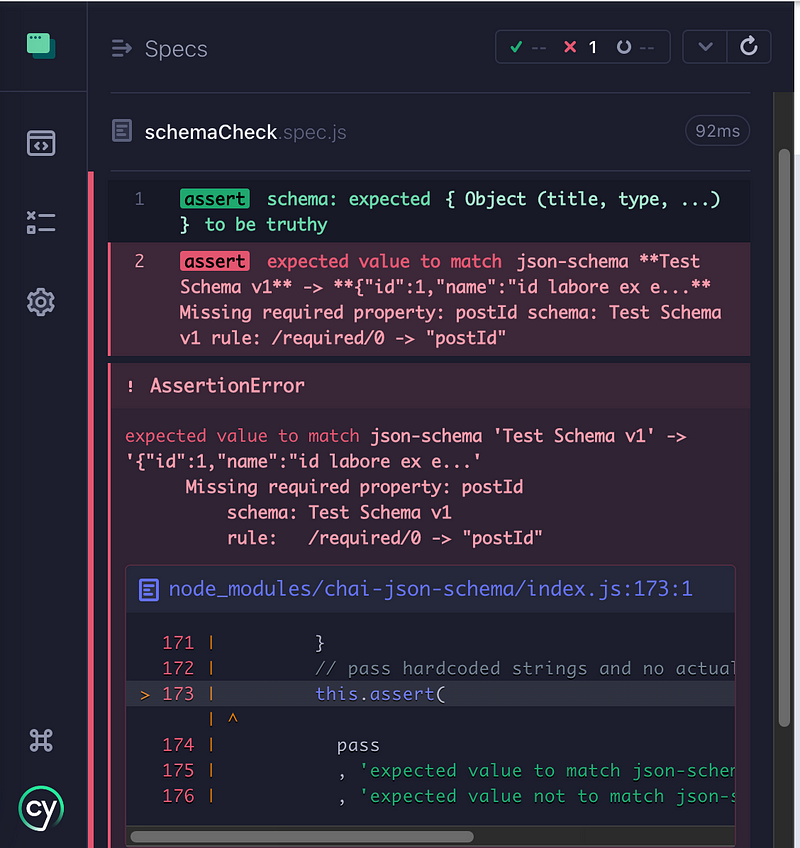
As we can see our test failed and we can see the Assertion Error highlighting that postId property is missing in the JSON object.

 Test Automation Stack
Leave a comment