
We often encounter with APIs in one form or other, it could be stand alone APIs which will be integrated with other third parties or APIs which are driving data to the Front end application from databases.
An API has three types of Architecture
REST
SOAP
RPC
REST is the popular and majorly used Architecture at present. A detailed explanation can be found here
In this article we will be focusing on testing REST API built using
node
express
nodemon
Before we start testing, first let’s understand about HTTP methods and status codes
Below are the few popular HTTP methods
- GET — This method retrieves existing data
- POST — This method creates new data
- PUT — This method creates new data or replaces existing data
- PATCH — This method updates the existing part of the data
- DELETE — This method deletes the existing data
For detailed information, refer here
Below are the HTTP Status codes
Status groups are classified into 5 categories
- 100–199 — Information Responses
- 200–299 — Successful Responses
- 300–399 — Redirection messages
- 400–499 — Client side error responses
- 500–599 — Server side error responses
We have got enough background to start writing API tests with Cypress now.
Cypress offers cy.request() method for interacting with APIs
Cypress Test for GET request to an API endpoint

The above test just makes a call and it doesn’t validates anything, which we don’t want. So let’s add an assertion to validate the status code.
it("Get all workouts", () => {
  cy.request("http://localhost:3000/api/v1/workouts/")
    .its("status")
    .should("eq", 200);
});
We can now check the response body length along with status code, but for that we need to get the full response returned from cy.request and pass it on to then/should like below
it("Get all workouts", () => {
  cy.request("http://localhost:3000/api/v1/workouts/").then((response) => {
    expect(response.status).to.equal(200);
    expect(response.body.data).to.have.length(5);
  });
});
If we need to validate the content of the response, we can do it below way
it("Get all workouts", () => {
  const expectedData = [{
    name: "Squats",
    mode: "AMRAP 20",
    equipment: ["rack", "barbell", "abmat"],
    exercises: ["30 abmat sit-ups"],
    trainserTips: ["Perform 30 sit-ups"],
    id: "8a82b16e-2292-44e8-b6ed-0c7c813b2b8a",
    createdAt: "10/9/2022, 4:48:40 PM",
    updatedAt: "10/9/2022, 4:48:40 PM",
  }];

  cy.request("http://localhost:3000/api/v1/workouts/").then((response) => {
    expect(response.status).to.equal(200);
    expect(response.body.data).to.have.length(5);
    expect(response.body.data).to.include.deep.members(expectedData);
  });
});
And if we execute this code our run result will look like below

Cypress Test for POST request to an API endpoint
POST Request will contain three parts to it
HTTP Method
URL
Body
The request can contain additional information as well, but in this article we just need the above three parts.
Our POST request to create a new workout will look like below
it("Create new workout", () => {
  const newWorkout = {
    name: "Squats-2",
    mode: "AMRAP 20",
    equipment: ["rack", "barbell", "abmat"],
    exercises: ["15 toes to bars", "10 thrusters", "30 abmat sit-ups"],
    trainerTips: [
      "Split your toes to bars into two sets maximum",
      "Go unbroken on the thrusters",
      "Take the abmat sit-ups as a chance to normalize your breath",
    ],
  };

  cy.request({
    method: "POST",
    url: "http://localhost:3000/api/v1/workouts",
    body: newWorkout,
  }).then((response) => {
    expect(response.status).to.equal(201);
  });
});
Validating HTTP Error codes
Along with testing API requests, we also need to ensure HTTP error codes, let us test that and in order to test it let us remove the mandatory field in the POST request body, which will result in HTTP error code 400
it("Check for HTTP error codes", () => {
  const newWorkout = {
    name: "Squats-2",
    equipment: ["rack", "barbell", "abmat"],
    exercises: ["15 toes to bars", "10 thrusters", "30 abmat sit-ups"],
    trainerTips: [
      "Split your toes to bars into two sets maximum",
      "Go unbroken on the thrusters",
      "Take the abmat sit-ups as a chance to normalize your breath",
    ],
  };

  cy.request({
    method: "POST",
    url: "http://localhost:3000/api/v1/workouts",
    body: newWorkout,
  }).then((response) => {
    expect(response.status).to.equal(400);
  });
});
If we run the above test, we will see below in test runner

This is not something we want isn’t it. Cypress has thrown error because by default cypress expects status code in range of 200 and 300. Anything else is treated as Failure.
To fix this we need to set the flag failOnStatusCode to false when we send the request
it("Check for HTTP error codes", () => {
  const newWorkout = {
    name: "Squats-2",
    equipment: ["rack", "barbell", "abmat"],
    exercises: ["15 toes to bars", "10 thrusters", "30 abmat sit-ups"],
    trainerTips: [
      "Split your toes to bars into two sets maximum",
      "Go unbroken on the thrusters",
      "Take the abmat sit-ups as a chance to normalize your breath",
    ],
  };

  cy.request({
    method: "POST",
    url: "http://localhost:3000/api/v1/workouts",
    body: newWorkout,
    failOnStatusCode: false,
  }).then((response) => {
    expect(response.status).to.equal(400);
  });
});
And now our test will pass

As a bonus, Our Cypress Ambassador and speaker Filip Hric has published plugin https://github.com/filiphric/cypress-plugin-api which will provide UI reference for the requests being sent and if we use the plugin, we will see below in test runner
it("Create new workout", () => {
  const newWorkout = {
    name: "Squats-2",
    mode: "AMRAP 20",
    equipment: ["rack", "barbell", "abmat"],
    exercises: ["15 toes to bars", "10 thrusters", "30 abmat sit-ups"],
    trainerTips: [
      "Split your toes to bars into two sets maximum",
      "Go unbroken on the thrusters",
      "Take the abmat sit-ups as a chance to normalize your breath",
    ],
  };

  cy.api({
    method: "POST",
    url: "http://localhost:3000/api/v1/workouts",
    body: newWorkout,
  }).then((response) => {
    expect(response.status).to.equal(201);
  });
});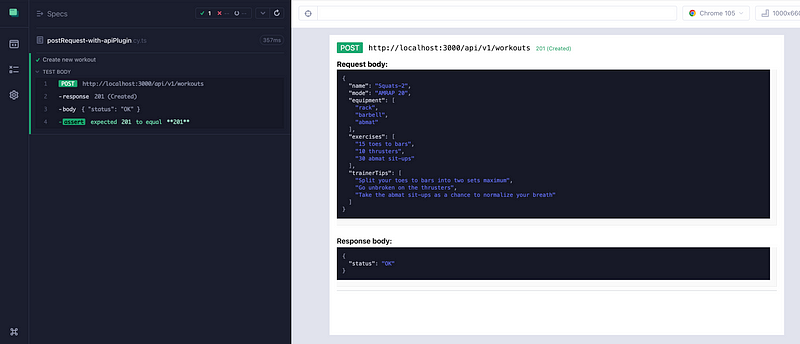
This looks great isn’t it. Give this plugin a try.
All the examples are available in the Git repo here

 Test Automation Stack
Leave a comment