
Every application will have some date picker, it could be just an input field where you can directly enter date in defined format or pick the date from calendar.
In this article we will see few ways to select the date from the Calendar.
Below is the simple date field, if you click on the input field, a calendar will pop up.

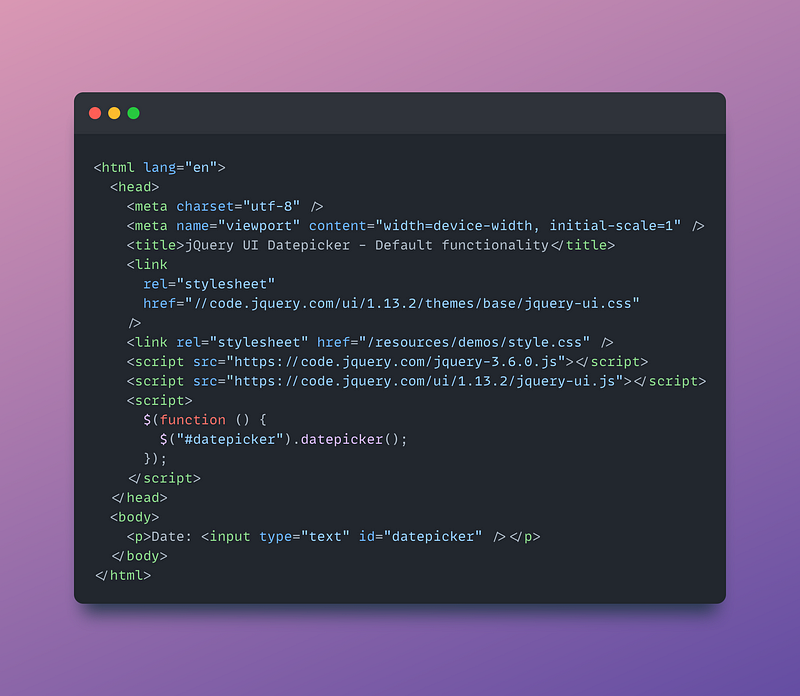
And below is the HTML page
If we inspect one of the date in the Calendar, it is like below

Let’s consider two way of selecting the date
Select a date without considering the month
Select a date for specific given month
Below is the cypress test for Selecting a date without considering the month. Here we use cypress contains method, where we pass particular date’s attribute and the text. This test will not care about what month the calendar is showing and it just clicks on the date which is specified in cy.contains method

Below is the cypress test for Select a date for specific given month. To achieve this let’s look at the DOM structure
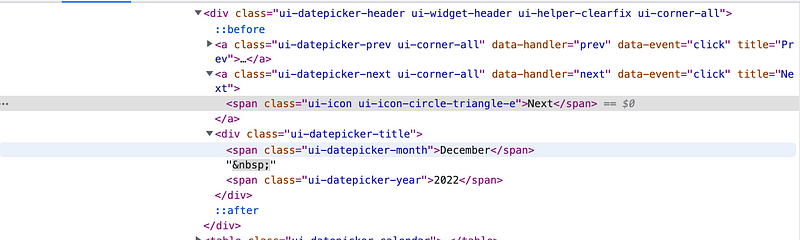
We have the Next icon, where we can navigate to next month and also we can get current Month from class ui-datepicker-month. So our cypress test now need to go in a loop where it first need to check the current month, if current month is not the one we want, it should navigate to the next month and then select the date.
Instead of getting into loop, we can use cypress-recurse plugin and write below code. Recurse function has three parts to it, first part gets the month, second part checks the condition and third part provides max limit to recurse the first two parts.

The working example can be found at my github repo https://github.com/gurudattgd04/cypress-example

 Test Automation Stack
Leave a comment